The simple idea
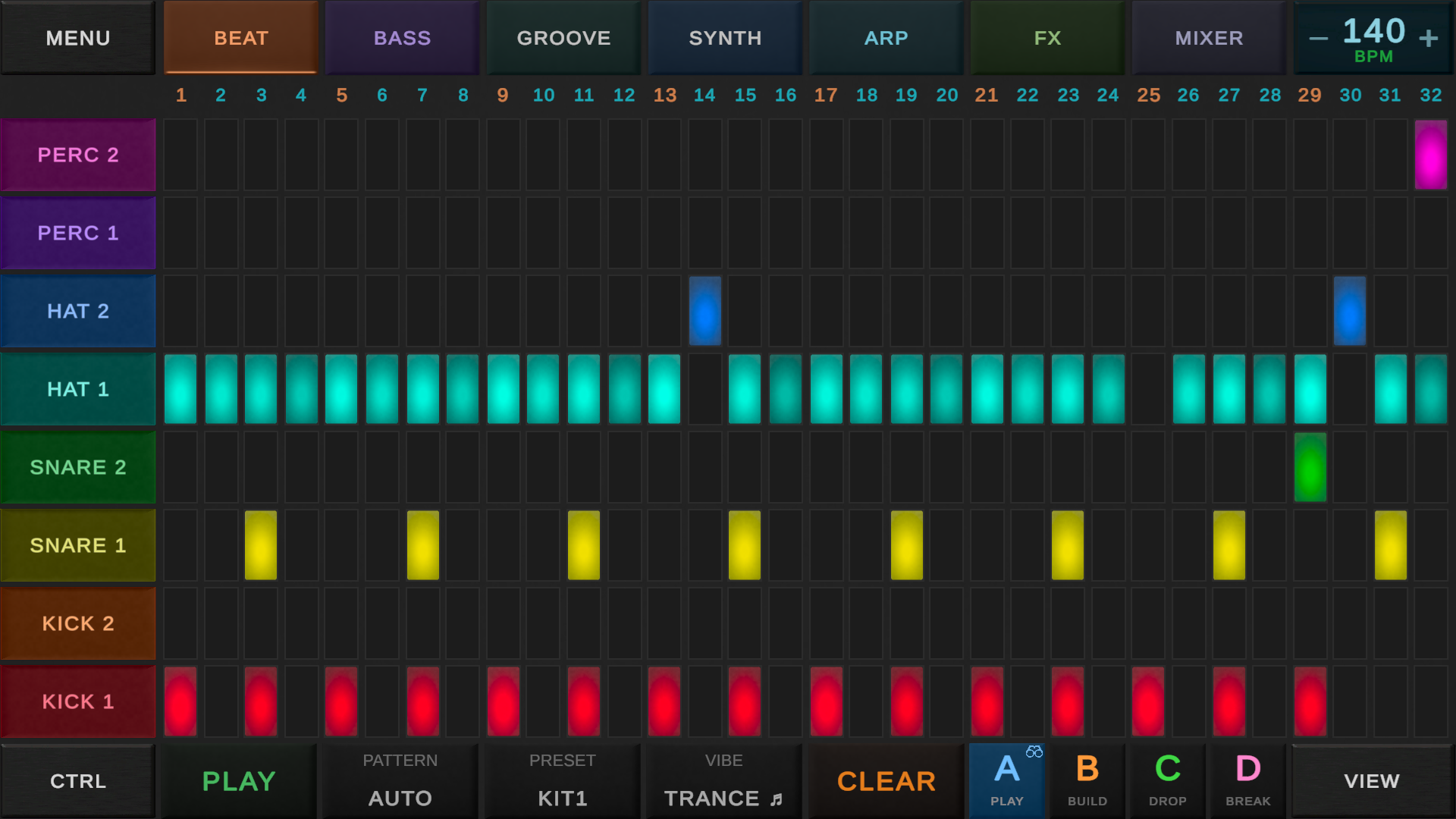
A step sequencer splits time into equal slots called steps. The slots sit in a row from left to right. Each slot can be on or off. When you press play, the sequencer moves through the slots at the speed you set and plays a sound on every slot that is on. When it reaches the end, it jumps back to the start and keeps looping.
Two directions, two jobs:
- Left to right is time. Each column is one step.
- Up and down is the sound. For drums, each row is a different drum. For melodies, each row is a different note.
That is the whole thing. Everything else you will read about below (swing, probability, longer patterns, and so on) is just extra on top of this same grid.
A tiny bit of history
The step sequencer comes from old drum machines. The Roland TR-808 (1980) and TR-909 (1983) had 16 buttons in a row. Each button was one step. You picked a drum, tapped the steps where you wanted it to hit, and pressed play. That look, a row of 16 glowing pads, is where most modern beat tools got their style.
Step sequencing also showed up on bass synths like the Roland TB-303 (1981) and the MC-202 (1983). You typed in the notes step by step and got a bassline back.
On home computers, trackers did something similar but turned the grid sideways. Time ran top to bottom instead of left to right. Soundtracker on the Amiga (1987) was the first big one, followed by ProTracker on Amiga and FastTracker on PC in the early 90s. Same idea, different look.
Today almost every beat app and groovebox has some version of a step sequencer. Ableton, FL Studio, Bitwig, Elektron hardware, Teenage Engineering pocket boxes, and DAWG all use one.
Steps, beats, and bars
Most music is counted in bars. A bar in the most common time signature (4/4) has 4 beats. Each beat is usually split into 4 smaller parts. That is how you end up with 16 steps in a bar, and that is why 16 is the default step count on almost every sequencer.
On a 16 step grid counted "1, 2, 3, 4":
- Steps 1, 5, 9, 13 are the four main beats. The ones you would tap your foot to.
- Steps 3, 7, 11, 15 sit right between the beats. The "and" in "1 and 2 and 3 and 4 and".
- The other steps are the smaller in betweens.
You do not need to count any of this out. Just tap cells and listen. Your ears will tell you when a hit feels on the beat or off the beat.
Swing makes it feel human
A pure step grid with nothing added sounds a bit robotic. Swing (sometimes called shuffle) fixes that by pushing every other step a little bit later. A tiny delay gives the pattern a bounce. Too much and you get a heavy swung groove like old hip hop or UK garage. The MPC style range is usually:
- 50%: straight, no swing.
- 54% to 62%: gentle groove, very common on modern beats.
- Around 66%: classic triplet style shuffle, strong hip hop feel.
- 75% and up: heavy, lazy swing.
Swing is often the difference between a beat that sounds like a person played it and a beat that sounds like a metronome.
Drums vs melodies
The grid works the same way in both cases, but the rows mean different things.
- Drums. Each row is a different drum. Kick on one row, snare on another, hi hat on another, and so on. You build a beat by tapping which drums hit on which steps.
- Melodies. Each row is a different note. Most beginner friendly apps lock these rows to a musical scale (like C minor) so every note you pick sounds good together. Higher row = higher note. You can build basslines, arpeggios, and simple tunes.
The scale lock is what makes melodic step sequencing so easy for beginners. You cannot really pick a wrong note, because only the right notes are on the grid.
What else a step sequencer can do
Most step sequencers go past the basic on and off. You will see some or all of these features:
- Velocity per step. How loud the hit is. Strong kicks on the main beats, softer ghost hits in between.
- Note length. How long the note holds. Short pokes vs long sustained notes.
- Pitch per step. On a melody grid, the actual note.
- Probability. A step that only fires sometimes, like 50% of the time. Great for making a loop feel alive across many bars.
- Longer patterns. Many sequencers can stretch past 16 steps. 32, 64, even 128. Longer patterns = more room for variation.
- Different lengths per track. Drums can be 16 steps while the bass is 12 or 7. The tracks drift against each other and make the loop evolve on its own.
Do not worry if your sequencer does not have all of these. You can make great music with just on, off, and velocity.
Step sequencer vs piano roll
These are the two main ways to write notes into a beat app. Most people use both.
- Step sequencer. Fast, visual, fixed grid. Best for drums, basslines, and simple repeating melodies. Every step is the same length.
- Piano roll. Notes float freely on a timeline. Notes can be any length and start anywhere. Best for expressive melodies, chords, and things that do not fit a perfect grid.
Start on the step sequencer. When you want a note that does not fit nicely in the grid, switch to the piano roll. See the piano roll guide for more on that.
Why it is great for beginners
- You see the whole pattern. No scrolling, no hidden layers.
- Changes are instant. Tap a cell and the next loop sounds different.
- Mistakes are cheap. Wrong hit? Tap it off and try another.
- No timing pressure. You do not need to play in time. The grid handles when things happen. You just pick what happens.
- With scale lock, no wrong notes. Every pick fits the key.
Classic patterns to try
Steal these, change them, break them. They are just starting points.
- Four on the floor. Kick on steps 1, 5, 9, 13. Base of house, techno, disco.
- Backbeat. Snare or clap on steps 5 and 13 (beats 2 and 4). Base of rock, pop, most hip hop.
- Eighth note hats. Hi hat on steps 1, 3, 5, 7, 9, 11, 13, 15. Keeps things moving.
- Sixteenth note hats. Hi hat on every step. Trap and modern rap.
- Boom bap. Kick on step 1 and around step 11 (the "and of 3"), snare on steps 5 and 13, hats with a bit of swing. 90s hip hop in one pattern.
- Reggae style. Skank (a short guitar or piano chord) on the "and" steps: 3, 7, 11, 15. The kick and bass sit differently depending on the riddim. Try kick on 1 and a simple bassline that plays with the skank.
- Acid style bass. Turn on a bunch of steps, pick notes that mostly stay on one note with a couple of jumps, add accents and slides if you have them. Inspired by the TB-303.
Step sequencer in DAWG
DAWG calls its step sequencer Simple mode. It works for 9 instruments: drums, bass, groove, synth, electric, guitar, arp, sampler, and vocal. Each instrument has its own grid.
Drums show rows of drum pads. Melodic instruments show rows locked to the scale you picked, so you can only place notes that fit the key. You can switch between instruments while the pattern is playing and hear the change right away.
Simple mode supports per step velocity (how hard each hit plays) and longer patterns with pages (up to 128 steps, shown 32 at a time). When you want more control, like notes of different lengths or expressive melodies, you can switch that instrument to the piano roll. Moving notes from the piano roll back to Simple mode may drop notes that fall outside the current scale, so pick your scale first if you plan to move back and forth.
New to DAWG? Start with how to make your first beat.
Common questions
Is a step sequencer the same thing as a drum machine?
Not quite. A drum machine is a whole device (or app) that has a step sequencer built in plus its own drum sounds. The step sequencer is just the grid part. A step sequencer on its own can control any sound, drum or melody.
How many steps should my pattern have?
16 is the default and covers one normal bar. Use 32 for a longer phrase. 64 or more if you want to put in lots of variation. 8 if you want a short loop.
Can I make melodies with a step sequencer?
Yes. Use a melodic step sequencer with scale lock on. It is great for basslines, arpeggios, and simple tunes. For more complex melodies with notes of different lengths, use a piano roll.
What is the difference between a step sequencer and a piano roll?
Step sequencer: a fixed grid where every slot is the same size. Fast for drums and simple parts. Piano roll: a free timeline where notes can be any size and anywhere. Better for melodies and anything that needs to be more expressive.
Do I need a keyboard to use a step sequencer?
No. You just tap cells. A MIDI keyboard is handy for recording melodies by hand, but for drums and simple basslines the grid is faster.
What tempo should I pick?
Depends on the style:
- Boom bap hip hop: around 85 to 95 BPM.
- Lofi: 70 to 90 BPM.
- House and pop: around 120 BPM.
- Techno: around 128 BPM.
- Trap: around 140 BPM (often half time feel).
- Drum and bass: around 170 BPM.
Start with the genre tempo, then move it up or down until it feels right.